
Work Items Import
BASIL provides a user interface to import work items from multiple file types.
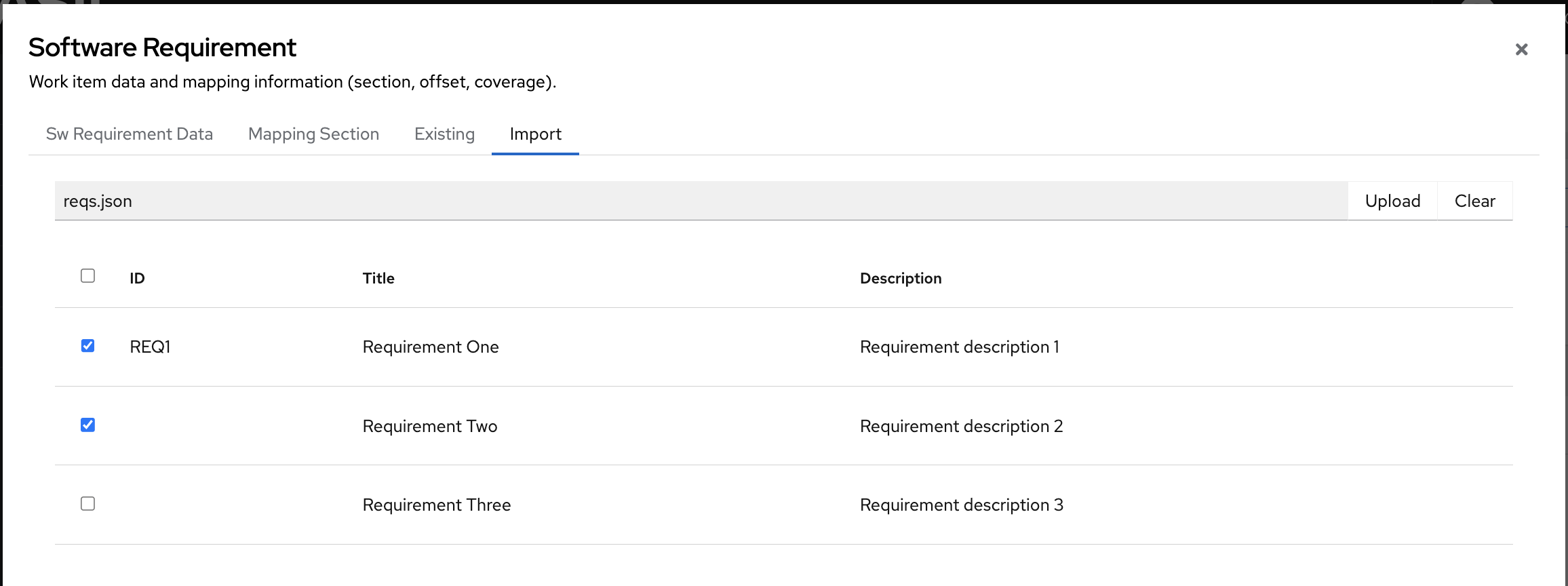
Example files are available under examples/import/.
Software Requirements
BASIL Software Requirements have two properties: title and description.
BASIL supports import from following file types:
YAML
Software Requirements can be defined in yaml format using a single dictionary as follows:
title: Software Requirement Example 1
description: |
 Statement that describes software requirement example 1
 on multimple lines
or using list of dictionaries as follows:
- title: Software Requirement Example 1
  description: |
    Statement that describes software requirement example 1
    on multimple lines
- title: Software Requirement Example 2
  description: |
    Statement that describes software requirement example 2
    on multimple lines
in both examples other properites can be populated.
These properites will be discarded but the id one.
id is optional and will not propagated into BASIL database that has its own ids but will be proposed to the user to simplify requirements selection at the time of the import.
Here an example:
id: SW-REQ-XXX-1 # will be ignored as data but proposed at the import time
created_at: 2025-05-12 # will be ignored
owner: Micky Mouse  # will be ignored
title: Software Requirement Example 1
description: |
 Statement that describes software requirement example 1
 on multimple lines
JSON
As per YAML files, a Software Requirement can be defined in single dictionary as follows:
{"title": "Software Requirement Example 1",
 "description": "Statement that describes software requirement example 1"}
or using list of dictionaries as follows:
[
   {"title": "Software Requirement Example 1",
    "description": "Statement that describes software requirement example 1"},
   {"title": "Software Requirement Example 2",
    "description": "Statement that describes software requirement example 2"}
]
in both examples other properites can be populated.
These properites will be discarded but the id one.
id is optional and will not propagated into BASIL database that has its own ids but will be proposed to the user to simplify requirements selection at the time of the import.
Here an example:
{"id": "SW-REQ-XXX-1",
 "created_at": "2025-05-12",
 "owner": "Micky Mouse",
 "title": "Software Requirement Example 1",
 "description": "Statement that describes software requirement example 1"}
SPDX JSONLD
In BASIL user can export work the software component traceability matrix in jsonld using the SPDX 3.0.1 SBOMs definitions and same file can be used to import Software Requirements.
A BASIL Software Requirement is exported as the following example:
{
  "type": "software_File",
  "spdxId": "spdx:file:basil:software-requirement:4",
  "software_copyrightText": "",
  "software_primaryPurpose": "requirement",
  "name": "Example Requirement one",
  "comment": "BASIL Software Requirement ID 4",
  "description": "Description of the example requirement one",
  "verifiedUsing": [
    {
      "type": "Hash",
      "algorithm": "md5",
      "hashValue": "6db25f81a86bab932810f1badd87dc57"
    }
  ],
  "creationInfo": "_:creation_info_spdx:file:basil:software-requirement:4"
},
and it is recognized by the import tool using the type field, that should be equal to ‘software_File’ and from the software_primaryPurpose field, that should be equal to ‘requirement’.
All the information of the work item are reported as stringified json inside an Annotation element.
Here following an example of an Annotation element that contains the information of the Software Requirement:
{
  "type": "Annotation",
  "annotationType": "other",
  "spdxId": "spdx:annotation:basil:software-requirement:4",
  "subject": "spdx:file:basil:software-requirement:4",
  "statement": "{\"id\": 4, \"title\": \"Example Requirement one\", \"description\": \"Description of the example requirement one\", \"status\": \"NEW\", \"created_by\": \"one1\", \"version\": \"1\", \"created_at\": \"2025-10-02 09:35\", \"updated_at\": \"2025-10-02 09:35\", \"__tablename__\": \"sw_requirements\"}",
  "creationInfo": "_:creation_info_spdx:file:basil:software-requirement:4"
},
Please note that the statement field contains the stringified json of the Software Requirement.
Other tools are also able to export Software Requirements in this format, StrictDoc is an example.
In the case of StrictDoc, the expected format is different from the one used by BASIL.
Requirements are exported in SPDX Snippets as follows:
{
   "@type": "Snippet",
   "@id": "SDOC-HIGH-REQS-MANAGEMENT",
   "name": "Requirement 'Requirements management'",
   "summary": "SPDX Snippet for requirement SDOC-HIGH-REQS-MANAGEMENT",
   "description": "StrictDoc shall enable requirements management.",
   "comment": "This snippet has been generated from a requirement defined in a StrictDoc file: hello.sdoc.",
   "verifiedUsing": [
     {
       "@type": "Hash",
       "algorithm": "sha256",
       "hashValue": "c14500147118475c1d43069f204a2a48b89a5eadbba8b4134bcaced66991ccd8"
     }
   ],
   "primaryPurpose": "documentation",
   "byteRange": {
     "@type": "PositiveIntegerRange",
     "begin": 29,
     "end": 164
   },
   "lineRange": {
     "@type": "PositiveIntegerRange",
     "begin": 4,
     "end": 8
   }
 }
BASIL will verify that the name field starts with ‘Requirement’ and will use the name and the description fields to populate a new Software Requirement.
XLSX
BASIL can also read Software Requirements from spreadsheets.
It will look for column headers with mandatory values title and description and will list all the rows below the identified header.
Header row can contains other columns. These columns will be discarded but the id one.
id is optional and will not propagated into BASIL database that has its own ids but will be proposed to the user to simplify requirements selection at the time of the import.